Plotting data with Octave
Plotting data with Octave
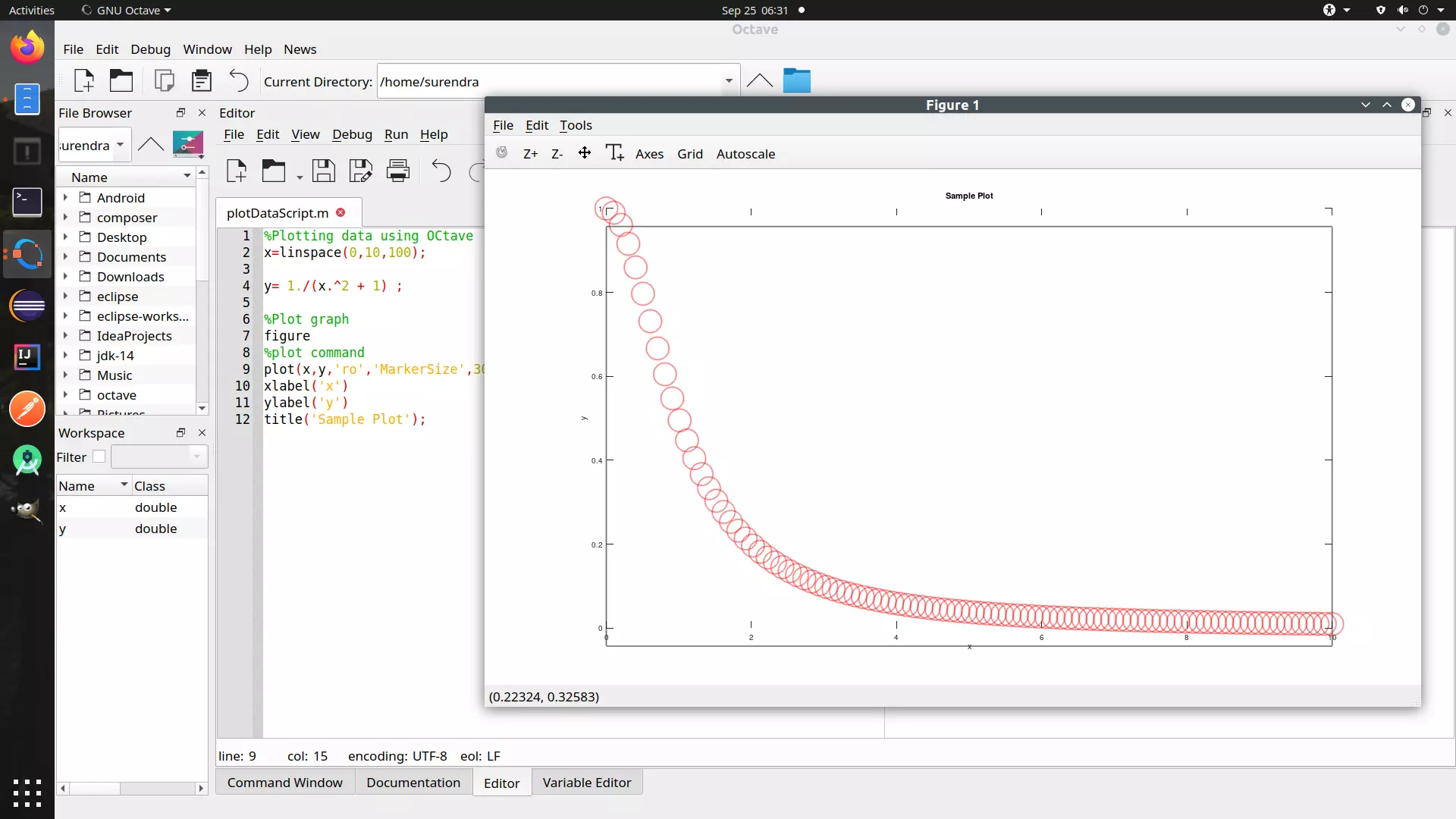
In this tutorial, we will learn detailed steps to plot data using an Octave script.
Sample function
We can choose any function. Let’s choose a simple function y defined as:
y= 1/(x^2 + 1);
Generate x vector with some sample points from 0 to 10.
x=linspace(0,10,100);
Calculate y vector.
y= 1./(x.^2 + 1) ;
Steps to create Script
Launch Octave.
File >> New >> New Script
File >> Save File to save the file.
Plot command
%Plotting data using OCtave
        x=linspace(0,10,100);

        y= 1./(x.^2 + 1) ;

        %Plot graph

        figure

        %plot command

        plot(x,y,'ro','MarkerSize',30)

        xlabel('x')

        ylabel('y')

        title('Sample Plot');
Screenshot
Octave Tutorial on this website can be found at:
https://www.testingdocs.com/octave-tutorial/
More information on Octave can be found on the official website:
https://www.gnu.org/software/octave/index