Comet Browser UI Interface
Comet Browser UI Interface
The Comet Browser, developed by Perplexity, features a AI-native Interface designed to transform traditional web browsing into an intelligent, conversational, and proactive experience.
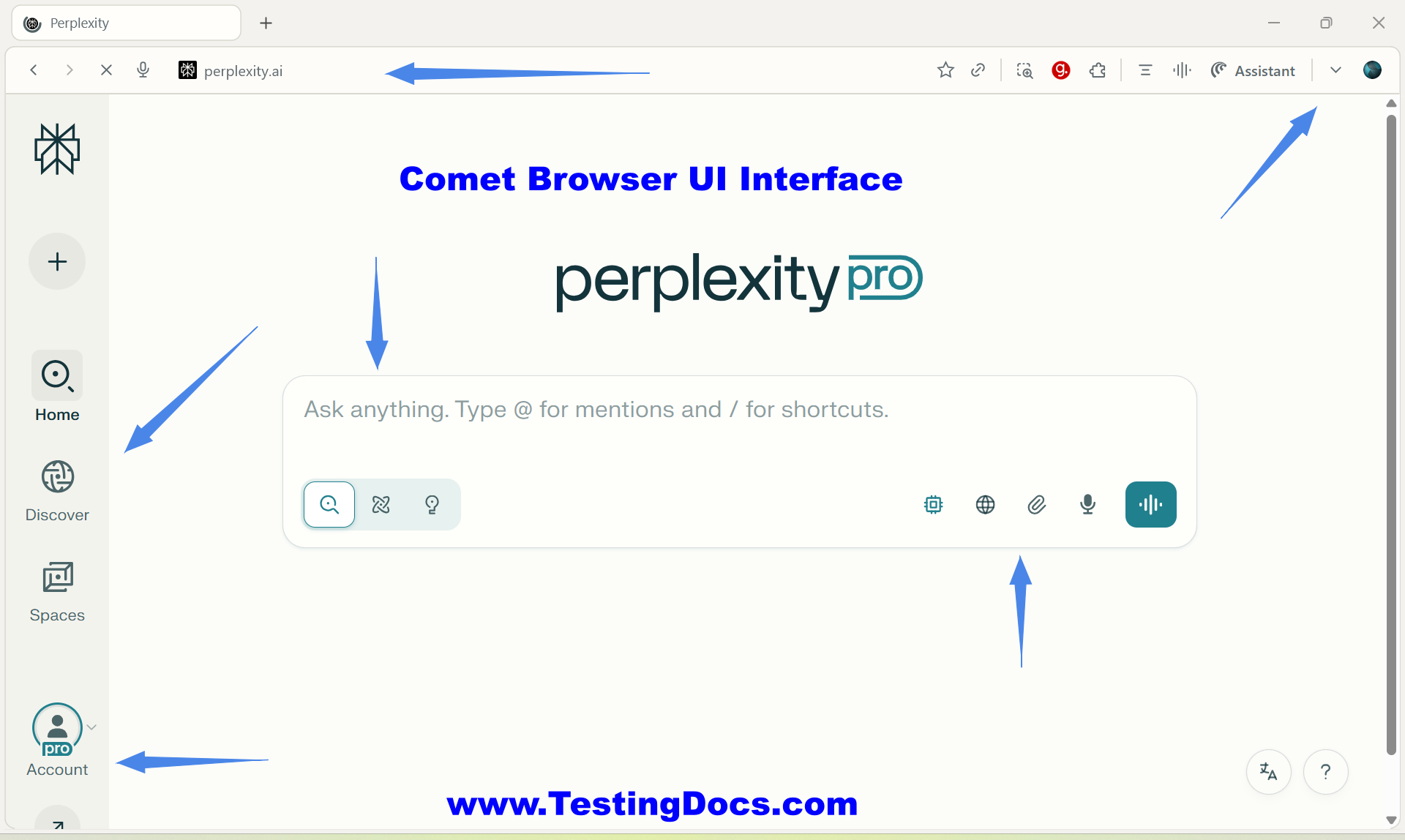
Comet UI Elements
The most common browser UI elements are as follows:
| UI Element | Description / Function |
|---|---|
| Address Bar (Omnibox) + “Voice Mode” Button | Enter URLs or natural-language queries; integrated “Voice Mode” button calls Perplexity AI for on-page questions or quick research. |
| Side Panel (AI Search Sidebar) | A collapsible panel to ask questions, create tasks, and trigger actions on the current tab. Docked panel that surfaces AI summaries, citations, and follow-up prompts without leaving the current tab. |
| Tab Strip | Standard Chromium tab bar with added AI-powered grouping, search, and quick-close commands through Comet Assistant. |
| Comet Assistant | Context-aware command palette to open apps, group tabs, extract emails, or generate content from the current page. |
| Bookmarks Bar | Pinned links; supports import from Chrome & Firefox and can be toggled via View ➜ Show Bookmarks Bar. |
| Extensions Menu | Puzzle-piece icon reveals installed Chromium extensions; Comet supports Chrome Web Store add-ons. |
| Profile / Account Menu | Top-right avatar opens Perplexity account settings, subscription status, and device sync controls. |
| Browser Settings | Chromium Settings page plus Comet section for AI sidebar behavior, privacy defaults (ad/tracker blocking), and keyboard shortcuts. |
| Downloads Tray ( Ctrl + J ) | Shows recent downloaded files with quick-open and “Show in Finder/Explorer”. |
| Context Menu (Right-Click) | Enhanced menu adds “Explain with AI” and “Summarize selection” items alongside standard copy/save options. |
| Status Bar (Bottom Hover Hint) | Displays target URL previews and loading progress; thin, unobtrusive bar appears only on hover or navigation. |