How to Fix “Could Not Find a Connected Android Device”
How to Fix “Could Not Find a Connected Android Device”
The “Could not find a connected Android device” error is typically an environment or configuration issue rather than a framework problem. A systematic troubleshooting approach—starting with ADB verification, emulator status, environment variables, and driver setup—will resolve the issue.
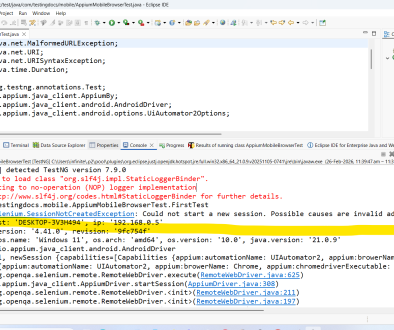
Sample Error Trace:
FAILED: com.testingdocs.mobile.AppiumMobileBrowserTest.FirstTest
org.openqa.selenium.SessionNotCreatedException: Could not start a new session. Response code 500. Message: Could not find a connected Android device in 20000ms
Host info: host: 'DESKTOP-3V3H494', ip: '192.168.0.5'
Build info: version: '4.41.0', revision: '9fc754f'
System info: os.name: 'Windows 11', os.arch: 'amd64', os.version: '10.0', java.version: '21.0.9'
Driver info: io.appium.java_client.android.AndroidDriver
Command: [null, newSession {capabilities=[Capabilities {appium:automationName: UIAutomator2, appium:browerName: Chrome, appium:chromedriverExecutable: chromedriver.exe, appium:deviceName: Pixel, platformName: ANDROID}]}]
Capabilities {appium:automationName: UIAutomator2, appium:browerName: Chrome, appium:chromedriverExecutable: chromedriver.exe, appium:deviceName: Pixel, platformName: ANDROID}
 at org.openqa.selenium.remote.ProtocolHandshake.createSession(ProtocolHandshake.java:114)
 at org.openqa.selenium.remote.ProtocolHandshake.createSession(ProtocolHandshake.java:75)
 at org.openqa.selenium.remote.ProtocolHandshake.createSession(ProtocolHandshake.java:61)
 at io.appium.java_client.remote.AppiumCommandExecutor.createSession(AppiumCommandExecutor.java:178)
 at io.appium.java_client.remote.AppiumCommandExecutor.execute(AppiumCommandExecutor.java:243)
 at org.openqa.selenium.remote.RemoteWebDriver.execute(RemoteWebDriver.java:604)
 at io.appium.java_client.AppiumDriver.startSession(AppiumDriver.java:308)
 at org.openqa.selenium.remote.RemoteWebDriver.<init>(RemoteWebDriver.java:211)
 at org.openqa.selenium.remote.RemoteWebDriver.<init>(RemoteWebDriver.java:197)
 at io.appium.java_client.AppiumDriver.<init>(AppiumDriver.java:98)
 at io.appium.java_client.AppiumDriver.<init>(AppiumDriver.java:109)
 at io.appium.java_client.android.AndroidDriver.<init>(AndroidDriver.java:108)
 at com.testingdocs.mobile.AppiumMobileBrowserTest.FirstTest(AppiumMobileBrowserTest.java:22)
 at java.base/jdk.internal.reflect.DirectMethodHandleAccessor.invoke(DirectMethodHandleAccessor.java:103)
 at java.base/java.lang.reflect.Method.invoke(Method.java:580)
 at org.testng.internal.invokers.MethodInvocationHelper.invokeMethod(MethodInvocationHelper.java:139)
 at org.testng.internal.invokers.TestInvoker.invokeMethod(TestInvoker.java:664)
 at org.testng.internal.invokers.TestInvoker.invokeTestMethod(TestInvoker.java:228)
 at org.testng.internal.invokers.MethodRunner.runInSequence(MethodRunner.java:63)
 at org.testng.internal.invokers.TestInvoker$MethodInvocationAgent.invoke(TestInvoker.java:961)
 at org.testng.internal.invokers.TestInvoker.invokeTestMethods(TestInvoker.java:201)
 at org.testng.internal.invokers.TestMethodWorker.invokeTestMethods(TestMethodWorker.java:148)
 at org.testng.internal.invokers.TestMethodWorker.run(TestMethodWorker.java:128)
 at java.base/java.util.ArrayList.forEach(ArrayList.java:1596)
 at org.testng.TestRunner.privateRun(TestRunner.java:819)
 at org.testng.TestRunner.run(TestRunner.java:619)
 at org.testng.SuiteRunner.runTest(SuiteRunner.java:443)
 at org.testng.SuiteRunner.runSequentially(SuiteRunner.java:437)
 at org.testng.SuiteRunner.privateRun(SuiteRunner.java:397)
 at org.testng.SuiteRunner.run(SuiteRunner.java:336)
 at org.testng.SuiteRunnerWorker.runSuite(SuiteRunnerWorker.java:52)
 at org.testng.SuiteRunnerWorker.run(SuiteRunnerWorker.java:95)
 at org.testng.TestNG.runSuitesSequentially(TestNG.java:1301)
 at org.testng.TestNG.runSuitesLocally(TestNG.java:1228)
 at org.testng.TestNG.runSuites(TestNG.java:1134)
 at org.testng.TestNG.run(TestNG.java:1101)
 at org.testng.remote.AbstractRemoteTestNG.run(AbstractRemoteTestNG.java:115)
 at org.testng.remote.RemoteTestNG.initAndRun(RemoteTestNG.java:293)
 at org.testng.remote.RemoteTestNG.main(RemoteTestNG.java:91)


===============================================
 Default test
 Tests run: 1, Failures: 1, Skips: 0
===============================================
common root causes and practical fixes to resolve the issue efficiently.
ADB Not Detecting the Device
Possible Causes:
- ADB server not running
- Device not authorized
- USB debugging disabled
- Faulty USB cable or port
Fix:
- Restart ADB server:
adb kill-server
adb start-server
adb devices
- Ensure device status shows “device” (not “unauthorized”)
- Enable Developer Options → USB Debugging
- Reconnect USB and accept authorization prompt
- Try a different USB cable or port
Incorrect ANDROID_HOME / ANDROID_SDK_ROOT Configuration
Possible Causes:
- Environment variables not set correctly
- Platform-tools not added to system PATH
Fix:
- Verify environment variables:
echo %ANDROID_HOME%
- Ensure platform-tools directory is added to PATH
- Restart terminal or IDE after updating variables
Emulator Not Running
Possible Causes:
- AVD not started
- Emulator crashed during boot
- Hardware acceleration issues
Fix:
- Start emulator manually:
emulator -avd <AVD_NAME>
- Verify device appears using:
adb devices
- Enable virtualization (VT-x / AMD-V) in BIOS
- Use “Cold Boot Now” in AVD Manager if emulator is stuck
Device in Offline State
Possible Causes:
- ADB communication failure
- Device USB mode misconfigured
Fix:
- Run:
adb reconnect
- Change USB mode to File Transfer (MTP)
- Revoke USB debugging authorizations and reconnect
Multiple Devices Connected Without UDID Specified
Possible Causes:
- Both emulator and physical device connected
- Automation script not specifying deviceName or udid
Fix:
- List devices:
adb devices
- Specify UDID in Desired Capabilities (Appium example):
{ "platformName": "Android", "udid": "emulator-5554" } - Disconnect unnecessary devices
Appium Server Issues
Possible Causes:
- Appium server not started
- Incorrect port configuration
- Driver mismatch (UIAutomator2 not installed)
Fix:
- Start Appium:
appium
- Verify installed drivers:
appium driver list
- Reinstall UIAutomator2 driver if required:
appium driver install uiautomator2
CI/CD Environment Issues
Possible Causes:
- No connected device on build agent
- Missing Android SDK on pipeline
- Emulator not started in headless mode
Fix:
- Ensure build agent has Android SDK installed
- Start emulator in CI:
emulator -avd <AVD_NAME> -no-window -no-audio
- Wait for boot completion:
adb wait-for-device
Debugging Checklist
- ✔ Run
adb devicesfirst - ✔ Confirm device state is “device”
- ✔ Validate environment variables
- ✔ Check Appium logs for driver initialization errors
- ✔ Confirm correct automationName (UIAutomator2/Espresso)