How to Fix org.openqa.selenium.SessionNotCreatedException
How to Fix org.openqa.selenium.SessionNotCreatedException
The org.openqa.selenium.SessionNotCreatedException: Could not start a new session usually indicates a deeper infrastructure or configuration problem rather than a simple coding mistake. This error commonly appears in local execution, Selenium Grid, Docker setups, or CI/CD pipelines.
Sample Error Trace
Error trace:

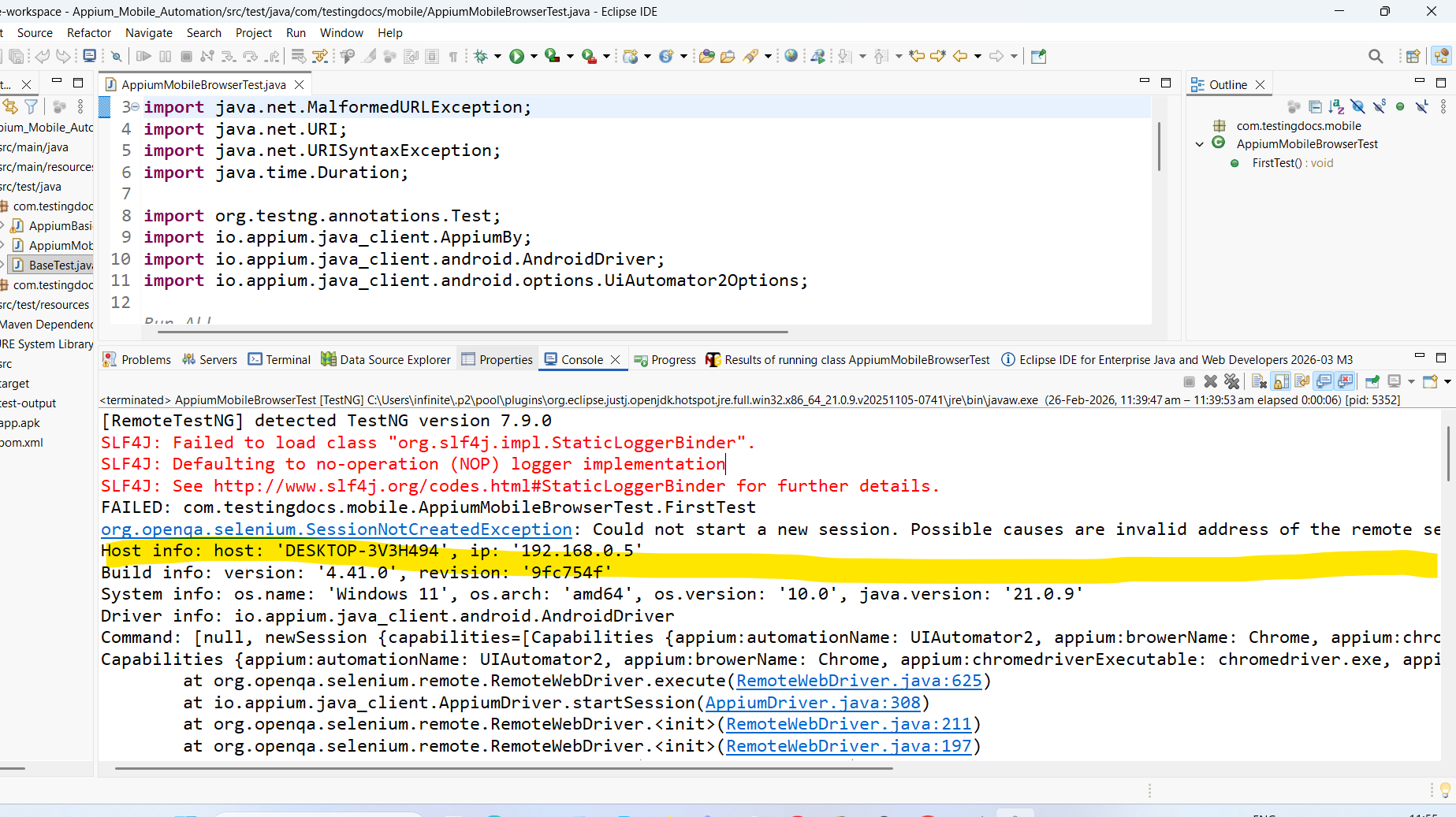
FAILED: com.testingdocs.mobile.AppiumMobileBrowserTest.FirstTest
org.openqa.selenium.SessionNotCreatedException: Could not start a new session. Possible causes are invalid address of the remote server or browser start-up failure. null
Host info: host: 'DESKTOP-3V3H494', ip: '192.168.0.5'
Build info: version: '4.41.0', revision: '9fc754f'
System info: os.name: 'Windows 11', os.arch: 'amd64', os.version: '10.0', java.version: '21.0.9'
Driver info: io.appium.java_client.android.AndroidDriver
Command: [null, newSession {capabilities=[Capabilities {appium:automationName: UIAutomator2, appium:browerName: Chrome, appium:chromedriverExecutable: chromedriver.exe, appium:deviceName: Pixel, platformName: ANDROID}]}]
Capabilities {appium:automationName: UIAutomator2, appium:browerName: Chrome, appium:chromedriverExecutable: chromedriver.exe, appium:deviceName: Pixel, platformName: ANDROID}
 at org.openqa.selenium.remote.RemoteWebDriver.execute(RemoteWebDriver.java:625)
 at io.appium.java_client.AppiumDriver.startSession(AppiumDriver.java:308)
 at org.openqa.selenium.remote.RemoteWebDriver.<init>(RemoteWebDriver.java:211)
 at org.openqa.selenium.remote.RemoteWebDriver.<init>(RemoteWebDriver.java:197)
 at io.appium.java_client.AppiumDriver.<init>(AppiumDriver.java:98)
 at io.appium.java_client.AppiumDriver.<init>(AppiumDriver.java:109)
 at io.appium.java_client.android.AndroidDriver.<init>(AndroidDriver.java:108)
 at com.testingdocs.mobile.AppiumMobileBrowserTest.FirstTest(AppiumMobileBrowserTest.java:22)
 at java.base/jdk.internal.reflect.DirectMethodHandleAccessor.invoke(DirectMethodHandleAccessor.java:103)
 at java.base/java.lang.reflect.Method.invoke(Method.java:580)
 at org.testng.internal.invokers.MethodInvocationHelper.invokeMethod(MethodInvocationHelper.java:139)
 at org.testng.internal.invokers.TestInvoker.invokeMethod(TestInvoker.java:664)
 at org.testng.internal.invokers.TestInvoker.invokeTestMethod(TestInvoker.java:228)
 at org.testng.internal.invokers.MethodRunner.runInSequence(MethodRunner.java:63)
 at org.testng.internal.invokers.TestInvoker$MethodInvocationAgent.invoke(TestInvoker.java:961)
 at org.testng.internal.invokers.TestInvoker.invokeTestMethods(TestInvoker.java:201)
 at org.testng.internal.invokers.TestMethodWorker.invokeTestMethods(TestMethodWorker.java:148)
 at org.testng.internal.invokers.TestMethodWorker.run(TestMethodWorker.java:128)
 at java.base/java.util.ArrayList.forEach(ArrayList.java:1596)
 at org.testng.TestRunner.privateRun(TestRunner.java:819)
 at org.testng.TestRunner.run(TestRunner.java:619)
 at org.testng.SuiteRunner.runTest(SuiteRunner.java:443)
 at org.testng.SuiteRunner.runSequentially(SuiteRunner.java:437)
 at org.testng.SuiteRunner.privateRun(SuiteRunner.java:397)
 at org.testng.SuiteRunner.run(SuiteRunner.java:336)
 at org.testng.SuiteRunnerWorker.runSuite(SuiteRunnerWorker.java:52)
 at org.testng.SuiteRunnerWorker.run(SuiteRunnerWorker.java:95)
 at org.testng.TestNG.runSuitesSequentially(TestNG.java:1301)
 at org.testng.TestNG.runSuitesLocally(TestNG.java:1228)
 at org.testng.TestNG.runSuites(TestNG.java:1134)
 at org.testng.TestNG.run(TestNG.java:1101)
 at org.testng.remote.AbstractRemoteTestNG.run(AbstractRemoteTestNG.java:115)
 at org.testng.remote.RemoteTestNG.initAndRun(RemoteTestNG.java:293)
 at org.testng.remote.RemoteTestNG.main(RemoteTestNG.java:91)
Caused by: org.openqa.selenium.remote.http.jdk.ConnectionException: Connection error (POST http://127.0.0.1:4723/session)
 at org.openqa.selenium.remote.http.jdk.JdkHttpClient.execute0(JdkHttpClient.java:488)
 at io.appium.java_client.internal.filters.AppiumIdempotencyFilter.lambda$apply$0(AppiumIdempotencyFilter.java:35)
 at io.appium.java_client.internal.filters.AppiumUserAgentFilter.lambda$apply$0(AppiumUserAgentFilter.java:86)
 at org.openqa.selenium.remote.http.Filter.lambda$andFinally$1(Filter.java:55)
 at org.openqa.selenium.remote.http.jdk.JdkHttpClient.lambda$executeAsync$2(JdkHttpClient.java:389)
 at java.base/java.util.concurrent.Executors$RunnableAdapter.call(Executors.java:572)
 at java.base/java.util.concurrent.FutureTask.run(FutureTask.java:317)
 at java.base/java.util.concurrent.ThreadPoolExecutor.runWorker(ThreadPoolExecutor.java:1144)
 at java.base/java.util.concurrent.ThreadPoolExecutor$Worker.run(ThreadPoolExecutor.java:642)
 at java.base/java.lang.Thread.run(Thread.java:1583)
Caused by: java.net.ConnectException
 at java.net.http/jdk.internal.net.http.HttpClientImpl.send(HttpClientImpl.java:955)
 at java.net.http/jdk.internal.net.http.HttpClientFacade.send(HttpClientFacade.java:133)
 at org.openqa.selenium.remote.http.jdk.JdkHttpClient.execute0(JdkHttpClient.java:463)
 ... 9 more
Caused by: java.net.ConnectException
 at java.net.http/jdk.internal.net.http.common.Utils.toConnectException(Utils.java:1065)
 at java.net.http/jdk.internal.net.http.PlainHttpConnection.connectAsync(PlainHttpConnection.java:227)
 at java.net.http/jdk.internal.net.http.PlainHttpConnection.checkRetryConnect(PlainHttpConnection.java:280)
 at java.net.http/jdk.internal.net.http.PlainHttpConnection.lambda$connectAsync$2(PlainHttpConnection.java:238)
 at java.base/java.util.concurrent.CompletableFuture.uniHandle(CompletableFuture.java:934)
 at java.base/java.util.concurrent.CompletableFuture$UniHandle.tryFire(CompletableFuture.java:911)
 at java.base/java.util.concurrent.CompletableFuture.postComplete(CompletableFuture.java:510)
 at java.base/java.util.concurrent.CompletableFuture$AsyncSupply.run(CompletableFuture.java:1773)
 ... 3 more
Caused by: java.nio.channels.ClosedChannelException
 at java.base/sun.nio.ch.SocketChannelImpl.ensureOpen(SocketChannelImpl.java:202)
 at java.base/sun.nio.ch.SocketChannelImpl.beginConnect(SocketChannelImpl.java:786)
 at java.base/sun.nio.ch.SocketChannelImpl.connect(SocketChannelImpl.java:874)
 at java.net.http/jdk.internal.net.http.PlainHttpConnection.lambda$connectAsync$1(PlainHttpConnection.java:210)
 at java.base/java.security.AccessController.doPrivileged(AccessController.java:571)
 at java.net.http/jdk.internal.net.http.PlainHttpConnection.connectAsync(PlainHttpConnection.java:212)
 ... 9 more


===============================================
 Default test
 Tests run: 1, Failures: 1, Skips: 0
===============================================
Understand the Root Cause
The exception message typically states:
org.openqa.selenium.SessionNotCreatedException:
Could not start a new session. Possible causes are:
invalid address of the remote server or browser start-up failure.
The two main causes are:
- Appium / Selenium server not running
- Invalid or unreachable RemoteWebDriver URL
- Browser failed to start due to driver/browser incompatibility or environment issues
Check Browser and Driver Version Compatibility
Version mismatch is the most common cause. Ensure:
- Chrome version matches ChromeDriver version
- Firefox version matches GeckoDriver version
- Selenium version supports your browser version
Fix: Use WebDriverManager to auto-manage drivers.
WebDriverManager.chromedriver().setup();
WebDriver driver = new ChromeDriver();
Or manually verify:
chrome://settings/help→ Check Chrome versionchromedriver --version→ Check driver version
Validate RemoteWebDriver URL (Grid / Docker / CI)
If you are using Selenium Grid or Docker:
WebDriver driver = new RemoteWebDriver(
 new URL("http://localhost:4444/wd/hub"),
 new ChromeOptions()
);
Verify:
- Hub is running
- Correct port (usually 4444)
- No firewall blocking the port
- Correct protocol (http vs https)
Test the Grid manually in browser:
http://localhost:4444/ui
If running in Docker, ensure container networking is correct:
docker ps
docker logs <container_id>
Fix Browser Startup Failures (Headless / Linux / CI)
In Linux or CI (Jenkins/GitHub Actions), Chrome may fail to start due to missing flags.
Fix: Add required ChromeOptions:
ChromeOptions options = new ChromeOptions();
options.addArguments("--headless=new");
options.addArguments("--no-sandbox");
options.addArguments("--disable-dev-shm-usage");

WebDriver driver = new ChromeDriver(options);
Especially important inside Docker containers.
Check System Resource Constraints
Session creation may fail due to:
- Insufficient RAM
- Too many parallel sessions
- CPU exhaustion
Check:
top
free -m
If using Grid, verify node configuration:
--max-sessions
--max-instances
Validate Capabilities Format (Selenium 4)
Improper capability merging can break session creation.
Incorrect:
DesiredCapabilities caps = new DesiredCapabilities();
caps.setBrowserName("chrome");
Correct (Selenium 4):
ChromeOptions options = new ChromeOptions();
options.setBrowserVersion("latest");
WebDriver driver = new RemoteWebDriver(gridUrl, options);
Check Logs for Deep Debugging
Always inspect:
- Selenium Server logs
- Node logs
- Browser driver logs
- CI console logs
Enable verbose logging:
-Dwebdriver.chrome.verboseLogging=true
Clean Up Zombie Sessions
Stale sessions may block new sessions.
pkill -f chromedriver
pkill -f chrome
Or restart Grid / Docker containers.