Linux host Command with Examples
Linux host Command with Examples
The Linux host command is a simple command-line utility used to perform DNS (Domain Name System) lookups. It helps students, system administrators, developers, and network engineers find the IP address associated with a domain name or determine the domain name associated with an IP address. Because it provides concise results, host is especially useful for quickly troubleshooting DNS-related problems.
DNS translates human-readable domain names such as example.com into IP addresses that computers use to communicate. The host command queries DNS servers to retrieve this information. On many Linux distributions, it is included in the bind-utils or dnsutils package.
Basic Syntax
The basic syntax of the command is:
$ host [options] domain_or_ipThe simplest usage is to provide a domain name:
$ host example.comThe output may show one or more IPv4 addresses (A records) and IPv6 addresses (AAAA records) returned by DNS.
Find the IP Address of a Domain
$ host google.comThis command performs a DNS lookup for google.com and displays the IP addresses associated with the domain. This is useful when checking whether a domain resolves correctly.
Reverse DNS Lookup
$ host 8.8.8.8When an IP address is supplied, host attempts a reverse DNS lookup. Instead of finding an IP address from a hostname, it tries to determine the hostname associated with the IP address.
Query a Specific Record Type
You can request a particular DNS record using the -t option:
$ host -t MX example.comThis queries the MX (Mail Exchange) records, which identify mail servers responsible for receiving email for the domain. Other commonly queried types include A, AAAA, NS, TXT, and CNAME.
Use a Specific DNS Server
$ host example.com 8.8.8.8Here, 8.8.8.8 is explicitly specified as the DNS server. This is helpful when troubleshooting problems with your default DNS resolver or comparing responses from different DNS servers.
Verbose DNS Information
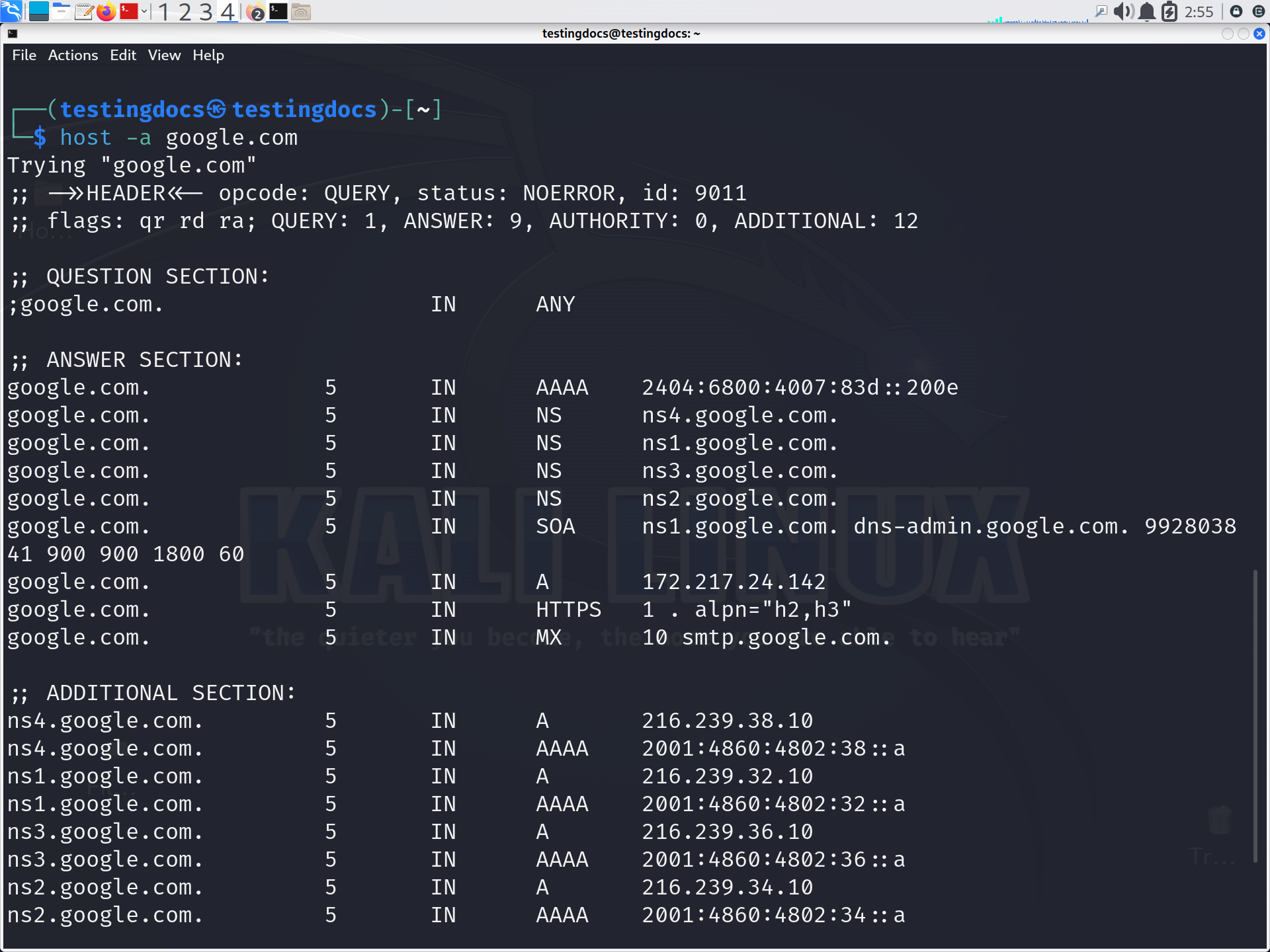
$ host -a example.comThe -a option attempts to provide all relevant DNS information available for the queried name. It can be useful during detailed DNS investigation and troubleshooting.
The host command is valuable for verifying DNS configuration, checking domain resolution, investigating email-related DNS records, performing reverse lookups, and diagnosing connectivity problems. Compared with more detailed tools such as dig, host presents DNS results in a compact and easy-to-read form.